
2020 - 2022
Strategy, Research & UX Design
Data & visuals restructed due to NDA
SGS, India
CONTEXT
Imagine a new food delivery service, like Uber Eats or DoorDash, just starting out, and Driver assignment is reactive and manual, leaving operators unprepared for real-time changes on the ground.
Opportunity
Design a product that simplifies this process, allowing operators to easily track drivers and deliveries, automating where possible, and creating a smoother workflow. The goal is to build a user-friendly platform that helps the company grow without getting bogged down in manual tasks.
What
Dispatch board to manage delivery drivers & orders.
Why
Manual tools are slow, error-prone, & don’t scale.
Who
Operators who coordinate drivers and deliveries.
Now lets break down each of the W's
WHAT Dispatch board to manage delivery drivers and orders
A dispatch board for food delivery services is a tool that helps manage the logistics and operations of food delivery businesses. It allows dispatchers to efficiently coordinate and ensure timely and accurate service to customers.
And, Do Operators need to work on site?
Many food delivery businesses operate with remote dispatchers who manage orders, drivers, and logistics from a central office, home office, or another remote location.

WHY Current Scenario
To understand the current scenario, it’s important to look beyond the order itself and focus on the operator managing it.
.png)
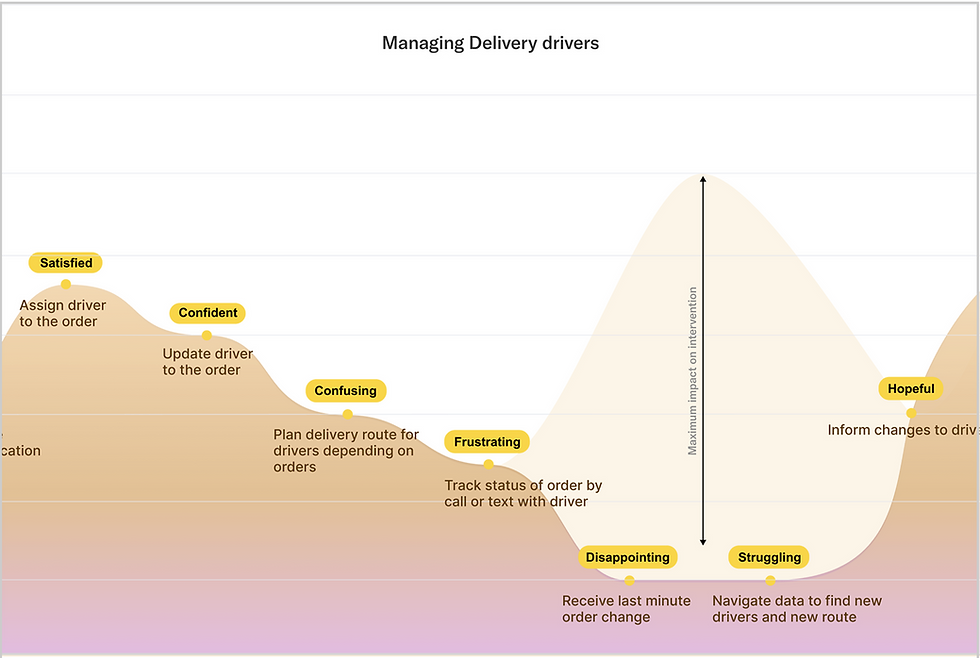
User Waveline Journey of Current Scenario
The User Wave Line below illustrates how manual tools, constant coordination, and last-minute changes shape their effort and emotions throughout the delivery journey.

Charting out the entire experience from operators to drivers, including unhappy paths helped focus on the ppint of intervention that would have the maximum impact.
Pain Points
Tracking location of the driver is challenging and Navigating list of drivers to assign to an order depending on various factors is a tedious task
Constantly updating the drivers status and location through phone is frustrating
Optimizing and planning a route for individual drivers so they can complete multiple orders at once is a tedious and stressful task
Identifying driver workload is difficult
Handling sudden challenges and changes in the delivery is hard
Communicating with the driver is challenging
We identified that the primary point point the employee faced was
Navigating through large amounts of data and making decisions off of it is challenging
Solution Goals
To define the scope clearly, we examine the journey timeline, the most critical user frustrations from the User Wave Line Journey (Ref. II), and the key considerations for structuring the solution.

Familiarity
Use familiar Excel terms and data fields in the digital portal to reduce the learning curve.

AI & Automation
AI to smart recommendations while keeping final decision-making with operators.

Digital Web App
Screen space and digital transitions to present data and support faster decisions.
How Might We - Opportunity Areas
Imagine sitting in front of screens packed with constantly updating data, trying to make decisions—but every new number and chart pulls your attention in a different direction. It’s overwhelming and slows you down. This made us ask: How Might We help users cut through the noise, stay focused, and make quick, confident decisions without feeling drained?
How might we help our users decide which driver to assign to an order?
01
How might we help our users optimize a drivers delivery route?
02
03
How might we inform our users with last minute updates?
How might we help our users sort drivers and orders assigned to them?
04
05
How might we help our users tackle last minute changes?
05
How might we help our users tackle last minute changes?
How might we help our users seamlessly navigate and make quick decisions through large amounts of data?
-
What challenges does a food delivery operation face?
-
How often do these challenges occur?
-
How do operators currently tackle?
-
How many orders does a service get in a day?
-
Are operators assigned for specific zones?
-
How many deliveries do drivers do in one trip?
-
Do operators have a specific list of drivers under them?
Brainstorming the delivery journey
Food delivery operators face daily challenges—changing locations, cancelled orders, traffic, weather, and vehicle or driver issues. The busier the day, the harder it gets to stay on top.
Operators use technology, GPS tracking, constant communication, and customer feedback to manage dozens to hundreds of orders. Drivers usually handle 2–3 deliveries per trip within assigned zones, with operators overseeing dedicated driver lists.
This made us ask: How might we make operations smoother, faster, and less overwhelming? These insights guided our divergent and convergent thinking.

Mapping the Experience
Information Architecture
Organizes all the underlying data, screens, and interactions, ensuring operators and drivers can access what they need quickly and efficiently.

User Flow
Shows the step-by-step journey—Receive Order → Assign Driver → Track Delivery—highlighting how tasks move from start to finish.


The Challenge
Handling a Delivery Breakdown
When a driver’s vehicle breaks down after picking up the order, the driver is automatically marked unavailable. Nearby drivers appear on the map, AI highlights the best match, and operators receive an instant alert to take action. The newly assigned driver gets an updated route, along with vehicle details and contact information, to complete the delivery smoothly.

Solution
The goal was to create an experience that feels fast and responsive—similar to a POS system—where interactions are quick and frictionless. Since this is an employee-facing application, the design focuses on reducing the number of screens operators need to navigate during a shift.
The interface is structured to surface everything at once: a live map on the right for spatial awareness, and a compact order overview on the left showing key stages—received, in progress, and completed. This layout allows operators to monitor, filter, and act on orders quickly without breaking focus.

Look and Feel
Electric Indigo was selected as the primary color for its modern, high-energy feel, paired with Inter for clarity and readability.
1. OPERATORS LANDING PAGE
Map view and Table view options - The dashboard offers a quick view of orders and drivers, showing key distances from pickup to delivery for fast decisions.

ASSIGNING A DRIVER
Clicking ‘Assign’ uses geo-fencing to show nearby drivers, letting the operator pick the best match. Nearby drivers are listed with key metrics, letting the operator choose the best option using distance and filter criteria.


Reassignment of Driver
The biggest challenge in decision making for the operators were due to last minute cancellations and reassignments.
ALERTS
Anytime theres a driver update, the alert order moves on the top.

Outcome
This project helped me better understand the real challenges fleet coordinators face in managing multiple orders and drivers at once. By focusing on visibility and reducing manual steps, the final solution made order assignment quicker and easier to manage. In testing, coordinators spent less time coordinating and felt more confident assigning deliveries based on real-time information. While there’s room to improve and scale the experience further, the outcome delivered a clearer, more reliable workflow that supports smoother day-to-day operations.